- Home Page /
- Mobile Phone Accessories /
- Accessories /
- Stylus Pens /
- Samsung Official Galaxy Note 20 & Note 20 Ultra S Pen w...
0 ratings







Item #:
52589360
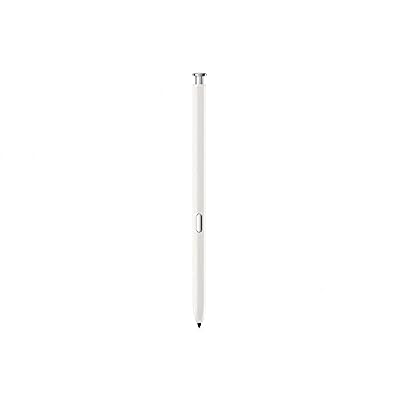
Samsung Official Galaxy Note 20 & Note 20 Ultra S Pen with Bluetooth (White)
Item #:
52589360
HUF 20978
Price Details
Excluding Shipping & Custom charges ( Shipping and custom charges will be calculated on checkout )
*All items will import from US
0 ratings
Write a review
Out of stock
 Imported from USA store
Secured transaction
Ubuy works hard to protect your security and privacy. Our advanced payment security system ensures confidentiality by encrypting your information during transmission using AES (Advanced Encryption Standards) and SSL (Secure Socket Layer) protocols. Your payment details are 100% secure as we do not share your payment details with third party sellers.
Our Top Logistics Partners


Fast
Shipping

Free
Return*

Secure Packaging

100% Original Products

PCI DSS Compliance

ISO 27001 Certified


Note: Step Down Voltage Transformer required for using electronics products of US store (110-120). Recommended power converters Buy Now.


What Stands Out
Bluetooth Connectivity
The S Pen includes Bluetooth technology, allowing users to control their device remotely, enhancing productivity and enabling innovative usage scenarios like taking selfies and controlling presentations seamlessly.
Precision Writing
Designed for accuracy, the S Pen provides a natural writing experience with low latency, making it perfect for note-taking and drawing, catering especially to creatives and professionals seeking efficiency.
Air Actions
With Air Actions, users can perform shortcuts and control apps with simple gestures. This feature adds convenience and elevates the user experience by minimizing screen time and maximizing efficiency.
Product Details
- Take advantage of the expansive screen on Galaxy S22 Ultra. S Pen features a slim 0.7mm pen tip with 4,096 pressure levels to write and sketch as naturally and accurately as putting pen to paper.
- S Pen becomes a remote control for your apps thanks to built-in Bluetooth capacity. Take pictures, switch between cameras, pause or turn up your playlist and so much more — all with a quick gesture or a click of the S Pen button on the side.
- Pull up the Air Command menu with a click of the S Pen button. Simply hover S Pen over the screen and click the button on the side to pull up features like Smart Select, Screen Write, Live Messages and more.
- Smartphone Compatibility: Galaxy Note 20 and Note 20 Ultra.
| Compatible Devices | Smartphone |
| Battery Description | Lithium-Ion |
| Minimum Required Operating System Version | Android 10.0 |
| Item Weight | 5 Grams |
| Item Dimensions | 4.33 x 0.79 x 0.79 inches (11 x 2 x 2 cm) |
| Enclosure Material | Plastic |
| Brand | Samsung |
| Model Number | EJ-PN980BWEGWW |
| Are Batteries Included | No |
| Are Batteries Required | No |
| Unit Count | 1.0 Count |
| Manufacturer | Partyreal |
| Mfr Part Number | EJ-PN980BWEGWW |
| Material | Plastic |
| Item dimensions L x W x H | 4.33 x 0.79 x 0.79 inches (11 x 2 x 2 cm) |
| Batteries Required? | No |
| Number of Packs | 1 |
Who Should Buy?

-
Creative Professionals
Artists and designers will appreciate the precision and functionality of the S Pen for drawing and editing.
-
Business Users
The S Pen enhances productivity with features like note-taking and presentations, ideal for professionals on the go.
-
Students
Students can benefit from digital note-taking and annotating documents, making studies more organized and efficient.

-
Casual Users
Individuals who only use basic phone functions may not need the advanced features of the S Pen.
-
Budget-Conscious Consumers
This premium accessory may not fit the budget of users who prefer more economical options without added functionalities.
-
Non-Samsung Users
Those using devices other than Samsung's Note series will not find compatibility with this S Pen accessory.
Product Description
Have any Query? Chat with us
Customer Questions & Answers
-
Question:
What is the functionality of the Samsung Galaxy Note 20 & Note 20 Ultra S Pen?
Answer: The Samsung Galaxy Note 20 & Note 20 Ultra S Pen is designed for enhanced productivity and creativity. It features Bluetooth connectivity, allowing you to control various phone functions wirelessly, such as taking photos, scrolling through presentations, or playing media. Furthermore, the S Pen includes pressure sensitivity, enabling precision for drawing or note-taking. This makes it perfect for artists, students, and professionals who want to create or annotate documents effortlessly. -
Question:
Is the Samsung Galaxy Note 20 & Note 20 Ultra S Pen compatible with other Samsung devices?
Answer: The S Pen is specifically designed for the Samsung Galaxy Note 20 and Note 20 Ultra. While some features may be compatible with other devices, such as the Galaxy Tab series that supports S Pen functionalities, full integration is limited to the Note series. Users benefit from unique features like Air Actions on the Note 20 series, enhancing task management and multitasking capabilities, showcasing the S Pen’s unique role in this line of Samsung smartphones. -
Question:
How do I connect the S Pen to my Samsung Galaxy Note 20 or Note 20 Ultra?
Answer: Connecting the S Pen is seamless. Simply remove it from its slot within your device, and the Galaxy Note 20 automatically detects it. Bluetooth settings will enable Air Actions and additional functionalities without needing prior setup. This ergonomic design ensures you have quick access to tools for note-taking or sketching. Use it for jotting down ideas on the go, drawing intricate designs, or controlling phone functions remotely, making it an essential tool for dynamic users. -
Question:
Can I customize the settings for the S Pen on my Samsung Galaxy Note 20?
Answer: Yes, you can customize various settings for your S Pen to enhance your experience. Within the device settings, you can configure Air Actions, change S Pen shortcuts, and adjust the sensitivity levels for writing or drawing. Personalization like this allows users to tailor their S Pen experience to match their workflow or artistic style. For example, you can set up a quick launch for your favorite apps, making multitasking more efficient. -
Question:
What is the battery life of the S Pen for the Galaxy Note 20 & Note 20 Ultra?
Answer: The S Pen incorporates a small battery that charges automatically when placed back into the device. Typically, it lasts for several hours of use on a single charge. Using the S Pen's Bluetooth functionalities, such as remote camera controls, can affect battery consumption based on activity level. In practical terms, this means you can rely on your S Pen for extended use during meetings, lectures, or creative sessions without frequent recharging. -
Question:
What colors are available for the Samsung Galaxy Note 20 & Note 20 Ultra S Pen?
Answer: The Samsung Galaxy Note 20 & Note 20 Ultra S Pen is available in multiple color options, including the classic White variant. The color can complement the corresponding phone colors, enhancing your device aesthetic. This way, users can express their personal style beyond the phone itself. For instance, pairing a white S Pen with a Mystic Bronze phone creates a bold and elegant look. -
Question:
Can I use the S Pen for drawing or sketching?
Answer: Absolutely! The S Pen is designed with artists in mind. It features precision tips with different pressure levels, making it perfect for drawing or sketching in applications like Samsung Notes, Adobe Illustrator, or various other creative apps. The natural feel and responsiveness provide a real-life drawing experience, ideal for both hobbyists and professionals. Use it to quickly capture ideas, create detailed illustrations, or develop digital art seamlessly. -
Question:
Is the Samsung Galaxy Note 20 & Note 20 Ultra S Pen waterproof?
Answer: The S Pen itself is not officially rated for waterproof capabilities like the Galaxy Note 20 and Note 20 Ultra, which do come with an IP68 rating. However, it is designed to withstand typical usage and small splashes. To ensure longevity, it’s best to avoid excessive exposure to water or moisture. This durability means you can use the S Pen outdoors without worrying too much about environmental factors. -
Question:
Where can I buy the Samsung Official Galaxy Note 20 & Note 20 Ultra S Pen with Bluetooth White in Hungary?
Answer: You can purchase the Samsung Official Galaxy Note 20 & Note 20 Ultra S Pen with Bluetooth White exclusively from Ubuy in Hungary. Ubuy offers a reliable platform for international shipping, ensuring that you receive authentic products safely at your location. This allows you to conveniently purchase the S Pen and have it delivered directly to your doorstep. -
Question:
What applications are best for using the S Pen?
Answer: The S Pen is compatible with multiple applications, but some of the best include Samsung Notes, Microsoft OneNote, Adobe Photoshop, and various drawing apps like Autodesk SketchBook. These apps utilize the S Pen's precision features, allowing detailed note-taking, illustration, or design work. Whether you're in a meeting, classroom, or creative studio, you can easily switch between tasks, making the most out of the S Pen's robust capabilities.
Samsung Stylus Pens EJ-PN980BWEGWW Editorial Review
The Samsung Official Galaxy Note 20 & Note 20 Ultra S Pen with Bluetooth White is a reliable replacement for your original S Pen. This product comes in a proper, sealed box with extra nibs included. The new pen works well with the Note 20 Ultra and fits perfectly into the slot provided for the S Pen. Setting up the new pen is hassle-free, just slide it into the phone and start using it. This product is reasonably priced and customers were satisfied with their purchase.
Customer Reviews & Ratings
511 customers ratings
-
5 Star
83%
-
4 Star
9%
-
3 Star
5%
-
2 Star
1%
-
1 Star
2%
Review this product
Share your thoughts with other customers
Pros
- Reliable replacement for original S Pen
- Comes in a proper, sealed box with extra nibs included
- Hassle-free setup
Cons
- One customer received a loose pen that fell out when carrying in a store
Product Price History
Important information
- Limitations : For products shipped internationally, please note that any manufacturer warranty may not be valid; manufacturer service options may not be available; product manuals, instructions, and safety warnings may not be in destination country languages; the products (and accompanying materials) may not be designed in accordance with destination country standards, specifications, and labeling requirements; and the products may not conform to destination country voltage and other electrical standards (requiring use of an adapter or converter if appropriate). The recipient is responsible for assuring that the product can be lawfully imported to the destination country. When ordering from Ubuy or its affiliates, the recipient is the importer of record and must comply with all laws and regulations of the destination country.
- Not all the products listed on Ubuy are for sale, as Ubuy is a global search engine. Products are subject to export/trade regulations.
HUF 20978
Currently unavailable.
We don't know when or if this item will be back in stock.
This item is not restrict in my country.(Please click on above link if this item is not restrict in your country, So our team will review and allow.)
Secured transaction
Ubuy works hard to protect your security and privacy. Our advanced payment security system ensures confidentiality by encrypting your information during transmission using AES (Advanced Encryption Standards) and SSL (Secure Socket Layer) protocols. Your payment details are 100% secure as we do not share your payment details with third party sellers.
Our Top Logistics Partners
Fastest cross-border delivery