- Startseite /
- Software /
- Video /
- Video Editing /
- Screen recorder software for PC record videos and take ...
0 ratings


Artikelnr.:
65045440
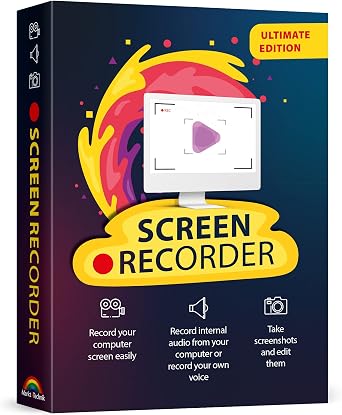
Screen recorder software for PC record videos and take screenshots from your computer screen compatible with Windows 11, 10, 8, 7
Artikelnr.:
65045440
HUF 11462
Price Details
Excluding Shipping & Custom charges ( Shipping and custom charges will be calculated on checkout )
*All items will import from USA
0 ratings
Schreiben Sie eine Bewertung
Auf Lager
 Vom USA Store für Sie importiert
QTY:
Bestellen Sie jetzt und erhalten Sie es am Donnerstag, Juni 25
Gesicherte Transaktion
Ubuy ist bestrebt, Ihre Sicherheit und Privatsphäre zu schützen. Unser fortschrittliches Zahlungssicherheitssystem gewährleistet Vertraulichkeit, indem Ihre Daten während der Übertragung mit AES (Advanced Encryption Standards) und SSL (Secure Socket Layer) Protokollen verschlüsselt werden. Ihre Zahlungsdaten sind 100% sicher, da wir Ihre Zahlungsdaten nicht an Drittanbieter weitergeben.
Unsere besten Logistigpartner


Fast
Shipping

Kostenlose
Rücksendung*

Sichere Verpackung

100 % Originalprodukte

PCI DSS-Standards

ISO 27001-zertifiziert


Note: Step Down Voltage Transformer required for using electronics products of USA store (110-120). Recommended power converters Jetzt kaufen.


Besondere Merkmale
Multi-Platform Compatibility
Works seamlessly with Windows 11, 10, 8, and 7, ensuring users can record and capture screen content on a wide range of devices without compatibility issues.
High-Quality Recording
Delivers superior video quality with customizable settings, allowing users to create professional-looking screen recordings that meet their specific needs.
Easy Screenshot Capture
Quickly take screenshots with a simple interface, enabling users to effortlessly capture important moments from their screen without additional software.
Produktdetails
- Capture videos and screenshots with sound from your computer screen
- Track mouse movement on screen recordings
- Integrate webcam footage into screen videos
- Simple editing capabilities for recordings
- Ideal for creating video tutorials, gaming content, and online classes
- Compatible with Windows 11, 10, 8, and 7
| Item Weight | 1 lbs (450 grams) |
Für wen ist das Produkt geeignet?

-
Content Creators
Ideal for YouTubers and streamers who need to capture and edit engaging video content efficiently.
-
Educators
Perfect for teachers and trainers creating instructional videos or tutorials to enhance remote learning experiences.
-
Business Professionals
Useful for professionals conducting presentations or meetings who wish to share their screens for clearer communication.

-
Casual Users
Individuals needing simple screen captures may find this software overly complex for basic tasks.
-
Gaming Enthusiasts
Gamers requiring high-performance recording may not find optimum quality compared to dedicated game capture solutions.
-
Outdated Systems
Users with older Windows versions may encounter compatibility issues or limited functionality with this software.
PRODUKTBESCHREIBUNG
Screen recorder software for PC record videos and take screenshots from your computer screen compatible with Windows 11, 10, 8, 7
Haben Sie eine Frage? Mit uns chatten
Kunden Fragen und Antworten
-
Frage:
What types of tasks can I perform with screen recorder software for PC?
Antworten: Screen recorder software for PC is versatile and can be used for a variety of tasks, such as capturing gameplay, conducting online tutorials, or creating presentation videos. Whether you're demonstrating software features or providing customer support tutorials, these tools allow you to record high-quality video along with audio. For instance, educators can create instructional videos that enhance learning engagement while gamers can share their gameplay highlights with friends. -
Frage:
Is screen recording software for PC compatible with all versions of Windows?
Antworten: Yes, most screen recorder software for PC is designed to be compatible with various versions of Windows, including Windows 11, 10, 8, and 7. This compatibility enables users on different systems to take advantage of screen recording functionalities. For example, whether you're updating from an older Windows version or using the latest, you can record your screen, ensuring that everyone has access to similar features regardless of the platform they are using. -
Frage:
What features should I look for in screen recorder software?
Antworten: When selecting screen recorder software, consider features like screen capture resolution, audio recording capabilities, the ability to record webcam videos, and editing options. High-resolution capture and clear audio are crucial for making professional-quality videos. For example, if you're creating marketing content, ensuring crisp visuals and sound can significantly impact audience engagement. -
Frage:
Can I use screen recorder software to take screenshots?
Antworten: Absolutely! Most screen recorder software for PC includes screenshot capabilities, allowing users to capture still images of their screen. This is useful for documentation, creating visual aids for presentations, or sharing specific content without needing video. For example, you may want to document a software bug or create guides for online platforms, making screenshots a vital feature. -
Frage:
Is it possible to record audio while screen recording?
Antworten: Yes, screen recording software typically allows you to record audio alongside your screen capture. This includes system audio, microphone input, or both. For instance, when creating video tutorials or webinars, recording your voice will help explain processes, making the content more informative and engaging for viewers. -
Frage:
Are there any limitations with using screen recorder software?
Antworten: While screen recorder software is powerful, there may be limitations, such as maximum recording duration or file sizes. Additionally, some software may limit features unless upgraded to a premium version. Understanding these limitations helps in choosing the right software based on your needs, especially when planning longer recordings, such as live streams or meetings. -
Frage:
How can I edit my recorded videos after capturing them?
Antworten: Many screen recording software options provide built-in editing tools, allowing you to trim segments, add effects, or annotate your videos. With these features, you can refine your recorded videos to focus on key points and enhance audience engagement. For example, adding captions or highlights can make your instructional videos clearer and more accessible. -
Frage:
What are the benefits of using a screen recorder for online meetings?
Antworten: Using screen recorder software for online meetings provides a reliable way to document discussions, making follow-up easier. Recordings can capture important points, decisions made, and action items discussed during the meeting. You can later share the recording with team members who were unable to attend or use it for reference in future projects. -
Frage:
Can I record gameplay using screen recording software?
Antworten: Yes, screen recorder software is widely used by gamers to record their gameplay, showcasing their skills or creating content for streaming platforms. By using dedicated recording software, players can capture high-quality video and share highlights or tutorials on various social media platforms. This is particularly popular for channels focusing on game reviews or gameplay tips. -
Frage:
How do I choose the right screen recorder software for my needs?
Antworten: Choosing the right screen recorder software depends on your specific requirements, such as whether you need just basic recording features or advanced editing tools. Researching user reviews, feature sets, and support options will help identify software that best meets your needs. For instance, a content creator will need different functionalities than someone simply recording meetings. -
Frage:
Where can I buy screen recorder software for PC compatible with Windows 11, 10, 8, 7?
Antworten: You can purchase screen recorder software for PC compatible with Windows 11, 10, 8, and 7 at Ubuy. Ubuy offers a wide range of software options that cater to different recording needs, ensuring that you find the right fit for your PC setup. Whether you're looking for a basic screen capture tool or a comprehensive software suite, Ubuy provides an easy platform to browse and purchase.
Markt + Technik Video Editing Editorial Review
The product in question presents a mixed bag of user experiences. While some customers laud its ease of use and straightforward setup, describing it as a reliable tool for their recording needs, others find significant issues that leave them frustrated. A common grievance is the confusing user manual, particularly for those who struggle with the German language, which has led to some opting for alternative software. A notable point of contention is the software's handling of the license key. Users report repeated prompts for the key upon each use, and several have faced expiration problems that render the application unusable after a limited number of sessions. This lack of effective support from the developer exacerbates the situation, as users reporting these issues found their queries ignored. On the brighter side, the core functionality—recording quality—receives praise, particularly for compatibility with Windows 10, and it has proven useful for specific tasks such as capturing snapshots for detailed analysis. Overall, users seeking a reliable recording solution may find value here, but those who prioritize support and a seamless experience might be left wanting. **
Kundenbewertungen
1 Kundenbewertungen
-
5 Sterne
100%
-
4 Sterne
0%
-
3 Sterne
0%
-
2 Sterne
0%
-
1 Sterne
0%
Bewerten Sie dieses Produkt
Teilen Sie Ihre Meinung mit anderen Kunden
Vorteile
- Easy to use with a straightforward setup
- Effective recording quality
- Good compatibility with Windows 10
- Useful for specific tasks like taking snapshots
Nachteile
- User manual is confusing, especially for non-German speakers
Produktpreisverlauf
Wichtige Information
- Einschränkungen: Für international versandte Produkte beachten Sie bitte, dass jegliche Herstellergarantie nicht gültig sein könnte; Herstellerservice-Optionen nicht verfügbar sein könnten; Produkthandbücher, Gebrauchsanleitungen und Sicherheitshinweise nicht in der Sprache des Ziellandes verfasst sein könnten; die Produkte (und Begleitmaterialien) könnten nicht im Einklang mit den Standards, Spezifizierungen und Etikettierungsvorgaben des Ziellandes entworfen sein; und die Produkte könnten nicht der Voltzahl und anderen elektrischen Standards des Ziellandes entsprechen (weshalb, falls zutreffend, die Verwendung eines Adapters oder Umwandlers erforderlich sein könnte). Der Empfänger ist dafür verantwortlich sicherzustellen, dass das Produkt legal in das Zielland importiert werden kann. Bei der Bestellung von Ubuy oder seinen Partnern ist der Empfänger der eingetragene Importeur und muss sich an alle Gesetze und Regulierungen des Ziellandes halten.
- Nicht alle auf Ubuy aufgeführten Produkte werden zum Verkauf angeboten, da Ubuy eine globale Suchmaschine ist. Produkte unterliegen Export-/Handelsbestimmungen.
HUF 11462
Bestellen Sie jetzt und erhalten Sie es am Donnerstag, Juni 25
Dieser Artikel unterliegt in meinem Land keinen Beschränkungen. (Klicken Sie bitte auf den obigen Link, wenn dieser Artikel in Ihrem Land keinen Beschränkungen unterliegt. Unser Team wird ihn dann prüfen und zulassen.)
QTY:
Gesicherte Transaktion
Ubuy ist bestrebt, Ihre Sicherheit und Privatsphäre zu schützen. Unser fortschrittliches Zahlungssicherheitssystem gewährleistet Vertraulichkeit, indem Ihre Daten während der Übertragung mit AES (Advanced Encryption Standards) und SSL (Secure Socket Layer) Protokollen verschlüsselt werden. Ihre Zahlungsdaten sind 100% sicher, da wir Ihre Zahlungsdaten nicht an Drittanbieter weitergeben.
Unsere besten Logistigpartner
Schnellste grenzüberschreitende Lieferung